gh CLI auth — persistent PAT session login
The jira-sdlc skills use the GitHub CLI (gh) to open PRs (gh pr create).
Rather than relying on the developer having run gh auth login by hand before a
session, the healthcheck logs gh in deterministically from a Personal Access
Token at the very start of every run — logging out first so a stale token
can't survive — and holds that session for the whole conversation.
This is the flow implemented in statuscheck.sh (and its Windows twin
statuscheck.ps1) — the pre-flight healthcheck every skill runs before it
touches anything. It's the healthcheck's job rather than a per-skill step
because gh uses one shared PAT (per-role GitHub identities are out of scope,
below), so — unlike Jira, where jira.sh carries a per-role credential on
every single request and there is no login to share in the first place — a
single role-agnostic login in the shared healthcheck covers every skill.
The setting: GITHUB_PAT_TOKEN
A fine-grained GitHub Personal Access Token, scoped to let gh pr create open
pull requests on this repo.
It is a secret, machine-specific value, so it lives only in the
gitignored .jst/jira-sdlc-tools.local.env — never in the tracked, team-shared
.jst/jira-sdlc-tools.env. This is the same treatment the Jira role tokens
(JIRA_*_TOKEN) get: real credentials never enter git history.
.jst/jira-sdlc-tools.local.env.example carries a placeholder entry
(GITHUB_PAT_TOKEN="XXXXXXXXXXXXXXXXXX") so a new checkout knows the variable
exists; you replace the placeholder with your own token in your local, untracked
jira-sdlc-tools.local.env.
Generating the token
On GitHub, navigate to the fine-grained token creation view:
- Click your profile picture (top right) → Settings.
- In the left sidebar, Developer settings → Personal access tokens → Fine-grained tokens.
- Click Generate new token (top right).
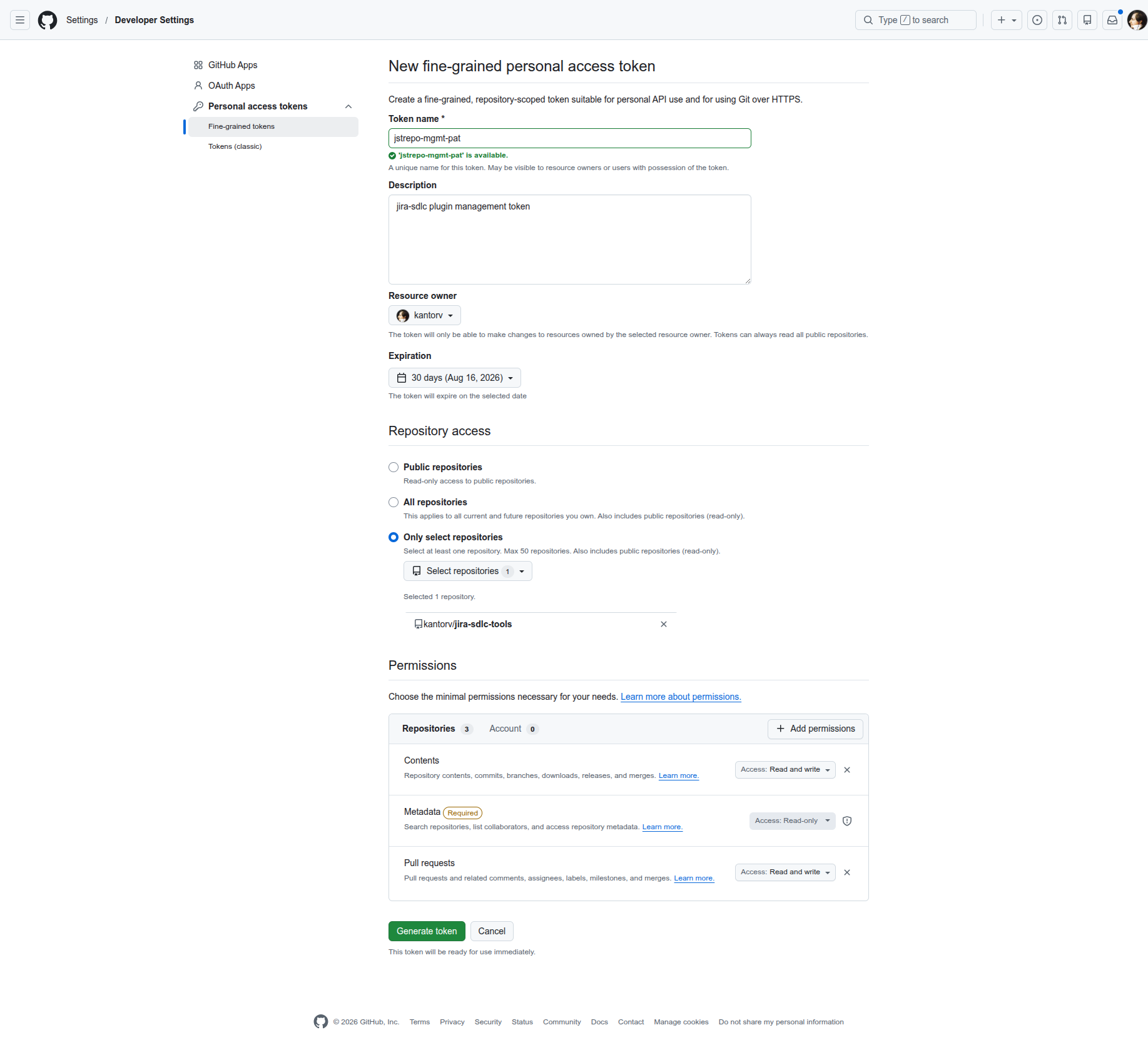
Then, on the token creation form:
- Repository access → Only select repositories → pick this repo.
- Permissions → Repository permissions:
- Contents → Read and write
- Pull requests → Read and write
- Metadata → Read-only — GitHub adds this automatically (it's marked Required); leave it as-is.
Those two write scopes are what let gh pr create push the branch and open the
PR. Copy the generated token and paste it as GITHUB_PAT_TOKEN in your local,
untracked jira-sdlc-tools.local.env.
What the healthcheck does
At the start of the run, the gh_auth check resolves GITHUB_PAT_TOKEN from
jira-sdlc-tools.local.env, logs gh out of github.com, then logs it back
in with the token — equivalent to:
source .jst/jira-sdlc-tools.local.env \
  && gh auth logout --hostname github.com \
  && echo "$GITHUB_PAT_TOKEN" | gh auth login --with-token \
  && gh auth status
The logout is the point: a second gh auth login does not reliably overwrite
an already-stored credential, so without it a stale (e.g. read-only)
token could survive and only surface as a 403 at gh pr create — after the work
is already implemented, committed, and pushed (JST-143). Logging out first
guarantees GITHUB_PAT_TOKEN is the active token before any work begins.
Because this runs first, the resulting gh session is held for the entire
conversation — subsequent gh calls (notably gh pr create) just use it. The
gh_auth row reports the logged-in account on success.
The opening logout is the only teardown. It drops whatever gh session was
there so a stale token can't linger; nothing logs back out at the end of the
run, so the GITHUB_PAT_TOKEN session persists for the whole conversation.
Windows caveat: the token is fed to gh from a file, not a pipe
The echo … | gh auth login --with-token shape above is what statuscheck.sh
does on POSIX. statuscheck.ps1 deliberately does not mirror it: Windows
PowerShell 5.1 prepends a UTF-8 BOM (EF BB BF) when a string is piped into a
native command, so gh receives BOM + token, forwards that to GitHub, and gets
a legitimate HTTP 401: Bad credentials — for a completely valid PAT
(JST-171). pwsh 7 does not do this, so the same token works there and fails
under 5.1, which is the confusing part.
If you hit this, the symptom is a gh_auth FAIL row reading
gh auth login --with-token failed: … HTTP 401: Bad credentials, whose remedy
line tells you to check the token. Regenerating the PAT will not help — a
fresh token fails identically. Check the runtime instead.
The Windows port therefore writes the token to a GUID-named temp file with an
explicitly BOM-free encoder and lets cmd redirect stdin from it, removing the
file in a finally block so no plaintext token survives a failed login either.
Nothing settable fixes the pipe on 5.1 — $OutputEncoding and
[Console]::OutputEncoding are not consulted, and .NET Framework builds the
StandardInput writer from [Console]::OutputEncoding and emits its preamble
(ProcessStartInfo.StandardInputEncoding, which would override it, is .NET
Core only). Setting GH_TOKEN instead is not an option here either: it lives
only in the current process, whereas this login has to persist a session that
the executor's later gh pr create — a separate process — depends on.
A login is not access: the gh_repo_access row
gh_auth proves the token logs in, and nothing more. A fine-grained PAT scoped
to only selected repositories logs in green, reads the org and every other
repo it was granted, and still cannot see this one — and GitHub answers 404,
not 403, for a repository a token has no access to, so it reads like a typo in
the repo name. With an SSH origin, every git operation keeps working, and
the first thing to break is gh pr create in the executor: mid-task, after the
work is committed and pushed.
So the healthcheck also probes the repository itself, in a separate
gh_repo_access row — gh api repos/<OWNER>/<REPO>, resolved from origin
(REST; gh repo view goes through GraphQL and fails with a different, less
legible error). A 404 there FAILs with the real remedy: add the repo to the
token's repository access at
github.com/settings/personal-access-tokens,
keeping Contents: read/write and Pull requests: read/write — and expect
an org-owned repository to need an org admin to approve the token as well.
Halt on a missing token
If GITHUB_PAT_TOKEN is not present in settings, the run stops: the
gh_auth row FAILs with a clear remedy (add GITHUB_PAT_TOKEN to
jira-sdlc-tools.local.env), exactly like every other FAIL row in the
healthcheck. Nothing downstream — no branch, commit, push, or PR — runs until
the token is supplied. This keeps a run from getting most of the way through and
only discovering the missing auth at gh pr create time.
Accepted tradeoff: this overwrites your own global gh login
gh auth login --with-token writes to ~/.config/gh/hosts.yml (the equivalent
OS-user-global config on Windows), which is global to the OS user, not
per-repo. Because the agent and the developer run as the same OS user, this
login overwrites the developer's own personal gh session — the run's
opening logout drops whatever was there, and since nothing logs back into your
personal identity afterward, it stays as GITHUB_PAT_TOKEN after the run.
This is a deliberately accepted tradeoff in favor of a simpler, session-wide
login: one gh auth login at the start, held for the whole conversation, versus
prefixing every gh invocation with a per-command token. If you need your
personal gh identity back afterward, re-run gh auth login yourself.
Note — a different, competing strategy exists. The per-command
GH_TOKEN=<pat> gh …approach (which deliberately never runsgh auth login/gh auth logout, so your globalghsession is never touched) is documented separately inGITHUB-AUTH-STRATEGY.mdin this same folder (introduced by JST-118). The two are competing designs for the same goal; this doc covers the persistent session-login approach.
Out of scope
- Per-role GitHub identities — one shared PAT is used, not a separate token per skill role. (Jira does use per-role accounts; GitHub does not.)
- Merges remain human-only.
- git remote /
git pushauth is unchanged — this is specifically about theghCLI session login.